Part 3 of 3: Study Startup vs. CTMS Series
In Part 1, we explained why CTMS platforms aren’t built for study startup. In Part 2, we covered when startup becomes a bottleneck. This post shows how a dedicated startup tool fits alongside the CTMS you already have.
Quick Answer
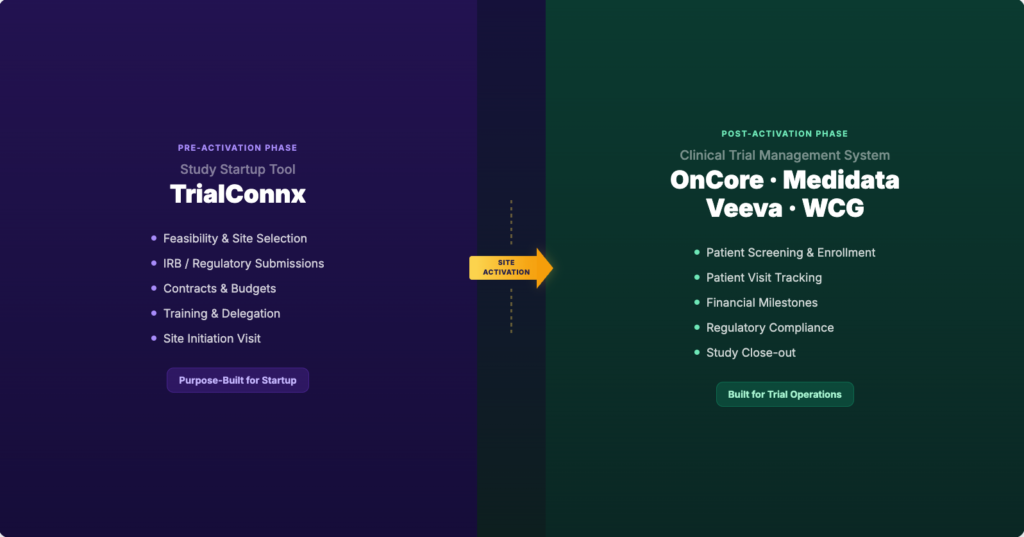
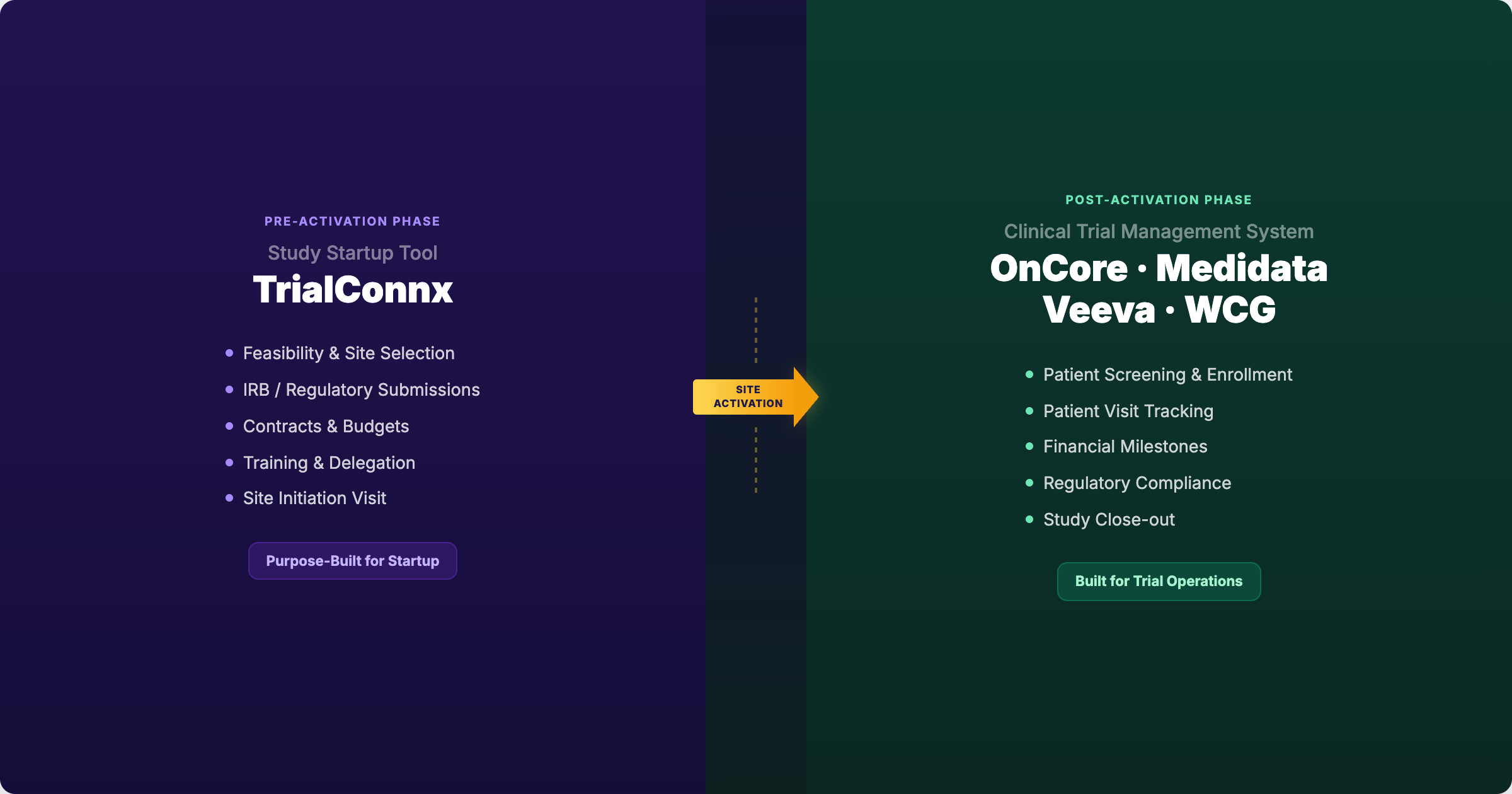
Study startup tools don’t replace OnCore, Medidata Rave, Veeva CTMS, or WCG eResearch. They cover a different phase: the pre-activation work that happens before your CTMS becomes relevant. Regulatory submissions, contract negotiations, budget creation, feasibility responses, and internal coordination all run in parallel during startup and hand off cleanly to the CTMS at site activation. The integration point is well-defined: when a study activates, the startup tool’s job is done and the CTMS takes over. Most implementations require no custom integration work because the two systems operate on sequential, non-overlapping phases.
Your tech stack already has layers
If you run clinical research at any scale, you already manage multiple systems. An eReg system for regulatory documents. An eConsent platform. A CTMS for trial operations. An EHR that connects clinical care to research. A finance system for invoicing and milestones. Each one covers a specific function. None of them tries to do everything.
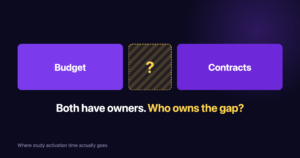
Study startup is the one function that still doesn’t have a dedicated layer. Instead, it runs on spreadsheets, email threads, shared drives, and the memory of whoever has been at the institution longest. That gap costs sites 25 to 30 days per study in internal handoffs alone (Tufts CSDD, 2024). It’s not a gap anyone planned. It formed because CTMS platforms expanded into trial management before startup had its own tooling category.
There’s a name for this gap: study startup systems. It’s the missing layer in the clinical tech stack, purpose-built to manage the pre-activation phase that your CTMS was never designed to cover. The question IT leaders are asking isn’t “do we need another system?” It’s “is the gap costing us more than filling it would?” For most sites running five or more concurrent studies, the answer is already clear. We explored why in When Study Startup Becomes a Bottleneck.
What OnCore, Medidata, Veeva, and WCG do well
This isn’t about what’s wrong with your CTMS. It’s about understanding what each platform was built for so you can see where the boundary is.
OnCore is the dominant CTMS in academic medical centers. It manages study calendars, patient visit tracking, coverage analysis, and financial milestones. For AMCs running NCI-designated cancer center portfolios, OnCore is deeply embedded in post-activation workflows.
Medidata Rave CTMS serves large CROs and sponsors managing multi-site global trials. It excels at enrollment tracking, randomization, site performance metrics, and sponsor-side reporting across hundreds of sites.
Veeva CTMS (part of the Veeva Vault Clinical Suite) targets sponsor and CRO operations with strong document management integration, milestone tracking, and regulatory intelligence across the clinical development lifecycle.
WCG eResearch (formerly Velos eResearch) serves academic medical centers and health systems with study management, regulatory tracking, and financial operations. For sites already using WCG’s IRB services, eResearch provides an integrated path from regulatory approval to trial operations.
All four platforms share the same architectural assumption: they manage what happens after a site activates. After regulatory approval is in hand. After contracts are executed. After the site is green-lit for enrollment.
| Platform | Primary Market | Core Strength | Phase Coverage |
|---|---|---|---|
| OnCore | Academic Medical Centers | Study calendars, coverage analysis, financial milestones | Post-activation |
| Medidata Rave CTMS | Large CROs, Sponsors | Enrollment tracking, multi-site coordination, sponsor reporting | Post-activation |
| Veeva Vault CTMS | Sponsors, CROs | Document management, milestone tracking, regulatory intelligence | Post-activation |
| WCG eResearch | AMCs, Health Systems | Study management, regulatory tracking, financial operations | Post-activation |
| Study Startup Tool | Research Sites, AMCs | Parallel workstream coordination, handoff tracking, time-in-stage visibility | Pre-activation |
The pattern is consistent: your CTMS picks up at activation. Everything before that point is the startup phase. And it’s the startup phase where sites lose an average of 25 to 30 days in internal handoffs alone (Tufts CSDD, 2024).
Where a startup tool sits in your clinical technology stack
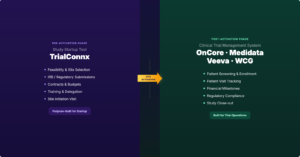
Here’s the part that matters most for IT planning. A study startup tool doesn’t sit on top of your CTMS. It sits beside it, covering a different phase of the same lifecycle. The boundary is clean: everything from feasibility through site activation lives in the startup tool. Everything from activation through study close lives in the CTMS.
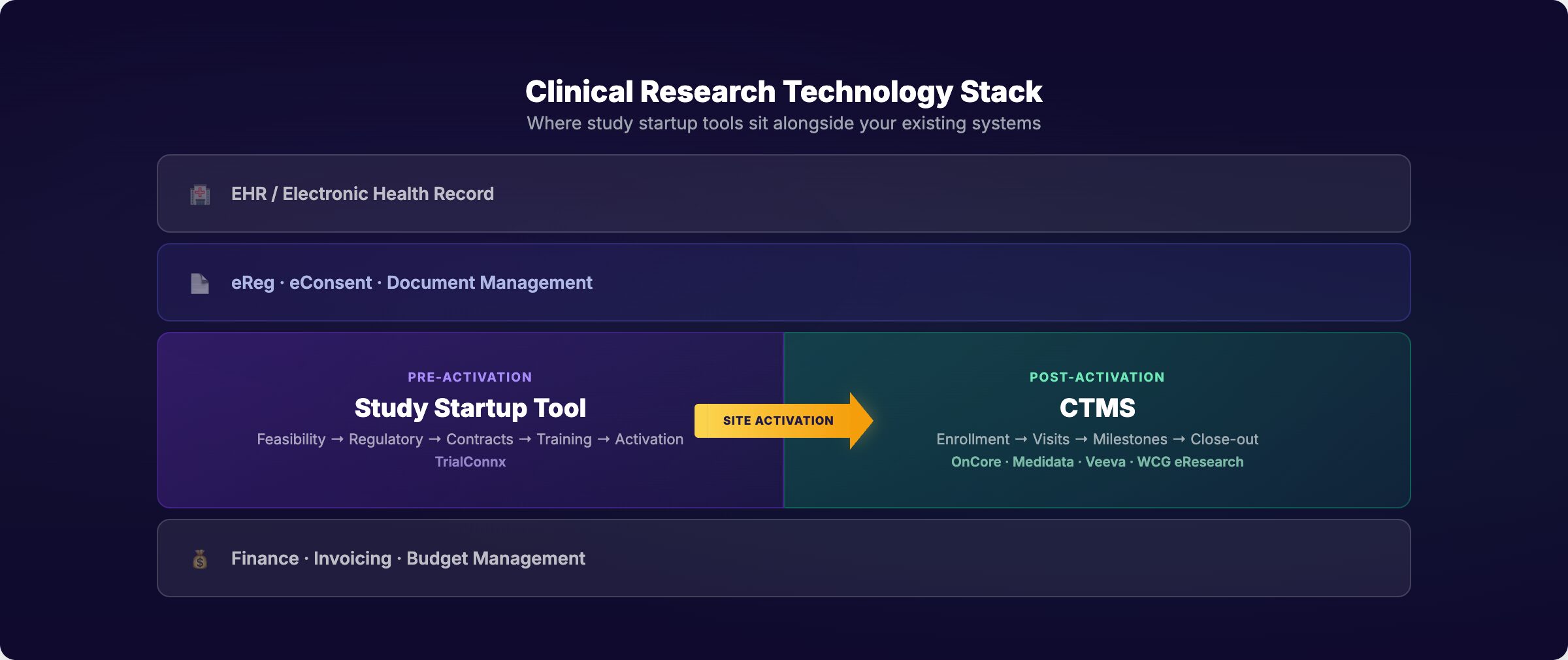
Sponsor sends feasibility questionnaire. Startup tool tracks response preparation, PI review, and submission. Your CTMS doesn’t touch this.
Package preparation, submission tracking, revision cycles, approval timelines. Parallel across multiple studies. Your CTMS records the approval date; the startup tool manages the process that gets you there.
Redline cycles, budget creation, negotiation tracking, execution timelines. Often the longest single phase. Your CTMS tracks the executed contract as a milestone; the startup tool tracks the 22 days of back-and-forth that preceded it.
Training completion, delegation logs, SIV scheduling, green-light checklist. This is the handoff point. When the startup tool marks a study as activated, the CTMS takes over.
Pro Tip: The cleanest way to evaluate fit is to ask: “Does this task happen before or after our first patient could enroll?” If before, it’s startup. If after, it’s your CTMS. The line rarely moves.
How data flows between systems
This is the question every CIO asks first, and the answer is simpler than most expect.
The two systems operate on sequential phases. They don’t need to share real-time data because they’re rarely active on the same study at the same time. The handoff happens once: at activation.
What the startup tool creates
- Regulatory approval dates and document status
- Contract execution dates and key terms
- Budget approval status and negotiation history
- Training completion records and delegation log status
- Feasibility response data and PI confirmation
- Time-in-stage and handoff duration metrics
What your CTMS needs at activation
- Confirmation that regulatory approval is complete
- Executed contract and approved budget
- Completed training and delegation documentation
- Green-light confirmation that the site is ready to enroll
The integration model
For most implementations, the integration is a defined handoff, not a continuous data sync. When activation readiness is confirmed, the study moves into the CTMS workflow. This can be as simple as a status notification or as structured as an API-based trigger.
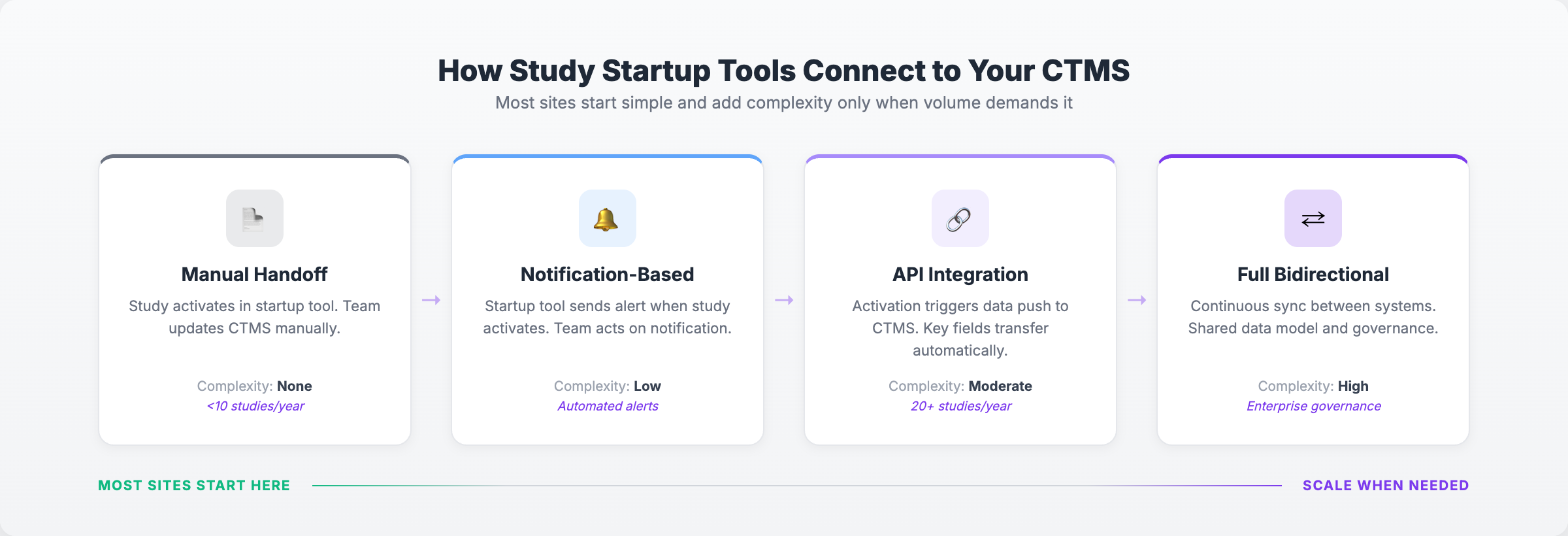
Most sites start with manual or notification-based handoff and move to API integration only when volume demands it. The point: you don’t need to plan a six-month integration project to get started.
The IT concerns (and honest answers)
If you’ve been burned by a clinical technology implementation before, these are the questions you’re already thinking about. Here are direct answers.
Study startup tools handle regulatory documents, contract details, and staff information. Any tool in this space should support encryption at rest and in transit, provide role-based access controls, and maintain clear data handling policies. Ask about their security practices and compliance roadmap before the demo.
Your team already manages credentials for multiple systems. A startup tool that requires separate login credentials creates friction and reduces adoption. SSO/SAML support isn’t a nice-to-have. It’s a requirement for any system touching institutional data.
Because startup tools don’t need deep integration with existing systems to deliver value, implementation timelines are measured in weeks, not months. Most sites can be running their first studies through the tool within 2 to 4 weeks of kickoff. Compare that to the 6 to 12 months a typical CTMS implementation requires.
Cloud-based startup tools handle updates, backups, and infrastructure. Your IT team isn’t maintaining another server or managing another upgrade cycle. The operational burden stays with the vendor.
Your data stays yours. Startup metrics, regulatory timelines, and process data should be exportable at any time. Ask about data portability and retention policies during evaluation. If a vendor can’t answer directly, move on.
Red Flags in Vendor Evaluation
Watch for startup tools that require replacing your CTMS, need 6+ months of implementation, can’t clearly explain their security practices, or store data in ways that conflict with your institution’s data governance policies. A complementary tool should simplify your stack, not complicate it.
What happens when the 89-day gap stays open
Most of these consequences don’t surface in a single study. They compound across three, five, ten concurrent startups until the pattern is impossible to ignore.
- Activation timelines stretch without explanation. The protocols aren’t harder. The sponsors aren’t slower. But every study takes longer than it should because coordination overhead grows faster than study count.
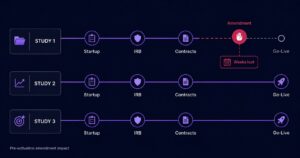
- Budget work starts late. At one AMC, budget negotiation couldn’t begin until Day 72 of a 120-day activation target. Sixty percent of the timeline was consumed before core financial work could start.
- IRB submissions get rushed. When coordinators are stretched across multiple startups, first-pass approval rates drop from 78% to 52%. Each revision cycle adds 13 or more days.
- Feasibility responses slow down. New opportunities sit in a queue while the team is buried in active startup work. Every delayed response is a study your site may not get.
- Status meetings replace actual work. What starts as a 90-minute weekly check-in becomes 6+ hours of reconstructing reality across spreadsheets, email, and hallway conversations.
These aren’t hypotheticals. They’re patterns we’ve seen at sites running three or more concurrent startups without a dedicated system for the pre-activation phase. The CTMS captures the downstream effects, but the root cause is upstream, in the 89 days before activation.
What changes for site teams
Technology decisions happen in IT offices. But the impact lands on coordinators, study managers, and PIs. Here’s what actually changes in daily workflows when a startup tool runs alongside your CTMS.
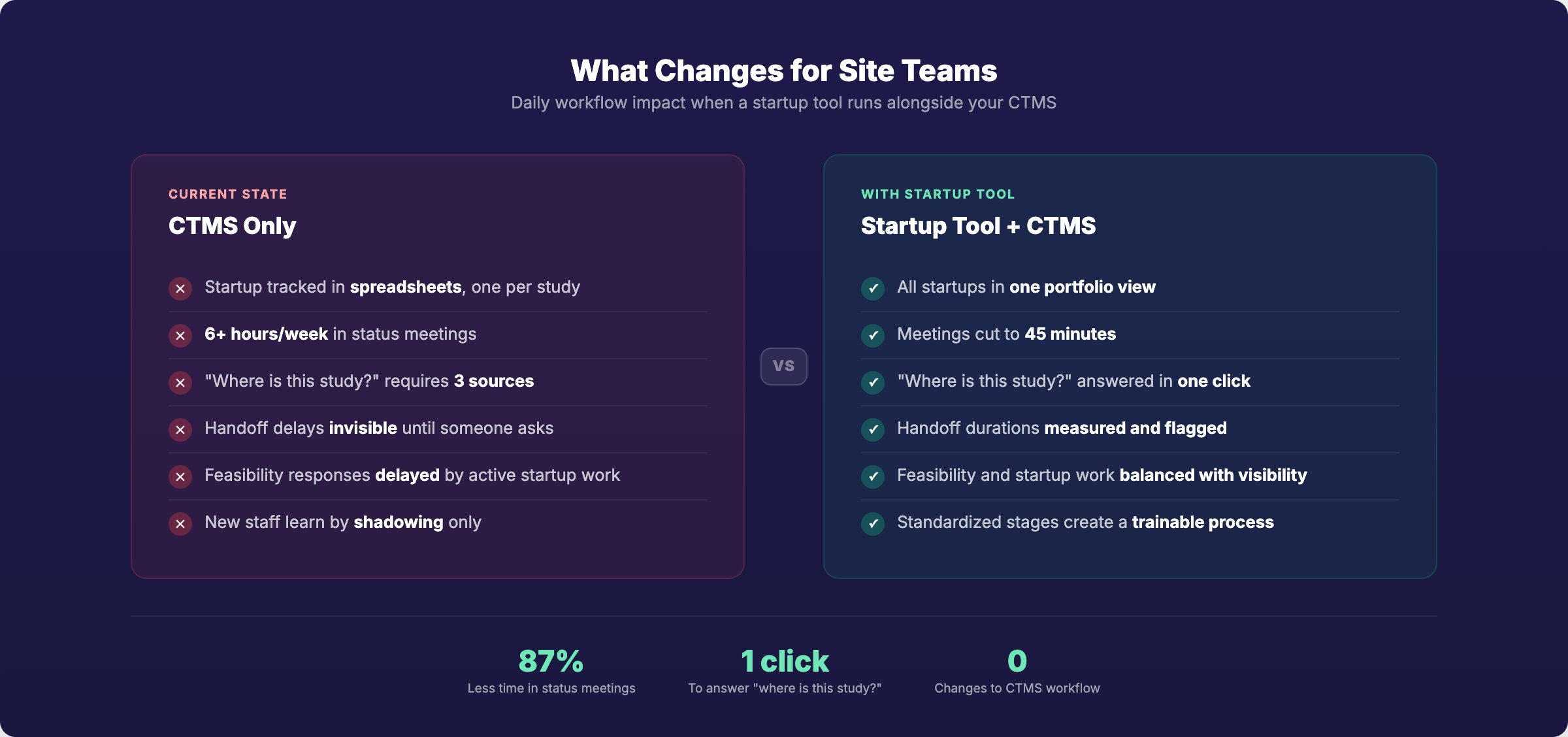
The coordinator who used to spend Monday mornings reconstructing status across spreadsheets now opens a dashboard. The study manager who scheduled weekly check-ins with four departments now reviews a portfolio view. The PI who asked “are we on track?” and waited two days for an answer gets it in real time.
The CTMS doesn’t change. It still does what it does well. The difference is that studies arrive at activation better prepared, with cleaner documentation, fewer last-minute scrambles, and staff who aren’t already burned out from the startup phase.
What this looks like in practice
Theory is useful. But here’s what this looked like at one site.
One Academic Medical Center’s Integration Experience
A major academic medical center and NCI-designated cancer center was running OnCore for post-activation trial management. Startup coordination ran on spreadsheets, email, and a shared drive. Their activation target: 120 business days. They weren’t consistently hitting it, and nobody could pinpoint why.
The existing stack
| System | Function | Phase |
|---|---|---|
| OnCore | Study calendars, coverage analysis, financial milestones | Post-activation |
| eReg system | Regulatory document storage | Both |
| Spreadsheets + email | Startup coordination, task tracking, status reporting | Pre-activation |
What the startup tool revealed
When they mapped their first three studies into a purpose-built startup tool, three things became visible that their existing systems had never surfaced:
- Lab manuals from sponsors weren’t arriving for three or more months into the activation process. This delay was invisible in their previous workflow.
- Budget work couldn’t start until Day 72 of a 120-day target. Sixty percent of their timeline was consumed before core financial work could begin.
- A 29-day wait to get in front of the PI for resource meetings. A scheduling bottleneck that nobody realized existed.
“We weren’t able to start our budget until Day 72 and we are charged with opening within 120 business days.”
Central Office Leadership
How the startup tool fit alongside OnCore
OnCore continued handling post-activation operations. The new layer managed pre-activation coordination. The two systems didn’t need integration because they covered sequential phases. When a study activated, the team moved operations into OnCore as they always had.
The difference: studies arriving in OnCore were better prepared. Documentation was complete. Training was verified. The scramble that used to happen at activation disappeared because the upstream process was visible and managed.
Results within 30 days
Saved per study
Faster activation
Changes to OnCore workflow
“The most important thing for your institution right now is to analyze bottlenecks… The timelines will start decreasing now that we have visibility on tasks.”
Central Office Leadership
Does this sound familiar?
You don’t need to run a formal evaluation to know if the 89-day gap is costing you. You just need to answer a few questions honestly.
If most of these are true, your current setup is working:
- You run fewer than 3 concurrent studies
- Your activation timelines are within industry median for your study phase
- You can answer “where is Study X in startup?” in under 2 minutes
- Your IRB first-pass approval rate is above 70%
If any of these sound familiar, the gap is already costing you:
- You run 5+ concurrent startups
- Activation timelines consistently exceed industry median
- Status updates require weekly meetings with multiple departments
- Staff turnover is connected to startup workload
- Your CTMS has a startup module but your team still uses spreadsheets
Questions for your vendor evaluation
| Category | Question | What to Look For |
|---|---|---|
| Security | What are your security practices and compliance certifications? | Clear documentation, encryption standards, compliance roadmap |
| Authentication | Do you support SSO/SAML? | Native support, not “on the roadmap” |
| Integration | What does integration with our CTMS require? | Honest answer about scope; “none required” is valid |
| Implementation | How long from contract to first study live? | Weeks, not months |
| Data | Can we export our data at any time? | Full export capability, clear retention policy |
| Fit | Does your tool manage post-activation operations? | “No” is the right answer. Complement, not overlap. |
See which pre-activation stages are adding weeks before your CTMS picks up.
Frequently Asked Questions
These are the questions that come up most during evaluation.
Does a study startup tool replace OnCore, Medidata, Veeva, or WCG eResearch?
No. A startup tool covers the pre-activation phase: feasibility, regulatory submissions, contracts, budgets, and internal coordination. Your CTMS continues managing post-activation operations: patient visits, enrollment tracking, financial milestones, and compliance. The two systems cover sequential phases of the study lifecycle and complement each other.
What integration work is required to connect a startup tool with my CTMS?
For most implementations, none. Because startup tools and CTMS platforms cover sequential phases, they don’t need to share real-time data. The handoff happens once at activation. Most sites start with a manual or notification-based handoff and add API integration only when study volume requires it. You don’t need a six-month integration project to get started.
How long does implementation take?
Most sites are running their first studies through a startup tool within 2 to 4 weeks of kickoff. Because the tool doesn’t need deep integration with existing systems, the implementation is primarily configuration and training. Compare that to the 6 to 12 months a typical CTMS implementation requires. The lighter footprint is a direct result of the narrower scope: managing startup, not the entire trial.
My CTMS has a startup module. Why would I need a separate tool?
Several CTMS platforms offer startup tracking as an add-on. On paper, it looks like coverage. In practice, it’s usually a milestone list bolted onto a system designed for post-activation workflows. If your team is using the startup module and still tracking day-to-day coordination in spreadsheets and email, the module isn’t solving the problem. Startup requires parallel workstream management, handoff tracking, and time-in-stage visibility that milestone-based add-ons don’t provide.
What security standards should I expect from a startup tool?
At minimum: encryption at rest and in transit, role-based access controls, SSO/SAML support, and clear data handling policies. The tool handles regulatory documents, contract details, and staff information. It should meet the same security expectations as any system in your clinical technology stack. Ask about their security practices and compliance roadmap during evaluation.
How does this fit into our budget when we’re already paying for a CTMS?
A startup tool isn’t a duplicate expense. It covers a phase your CTMS doesn’t manage. The business case comes from the time you’re currently losing: 25 to 30 days per study in internal handoffs, rushed IRB submissions that add revision cycles, and staff burnout that drives turnover. One academic medical center saved 21 days per study within the first month. At that rate, the tool pays for itself in avoided delays and recovered capacity.
The stack is simpler than you think
Your CTMS manages trials. Your eReg manages documents. Your EHR manages patients. Each system covers its phase. Study startup is the phase that’s been running on workarounds. That’s the 89-day gap.
Filling it doesn’t complicate your stack. It completes it. A study startup system sits beside your CTMS, covers the pre-activation phase, and hands off cleanly at activation. No overlap. No integration required to start.
Map your last three study startups. Count the days between stages. That gap is where the weeks are hiding.
Study Startup vs. CTMS Series
Part 1: Why Your CTMS Isn’t Built for Study Startup
Part 2: When Study Startup Becomes a Bottleneck (And What to Do About It)
Part 3: How Specialized Study Startup Tools Work Alongside OnCore, Medidata, and Veeva (You are here)
Map Where Your Startup Time Goes
See which pre-activation handoffs are adding weeks before your CTMS picks up. No integration required to start.
Sources
- Tufts Center for the Study of Drug Development (2024). Study startup cycle time benchmarks.
- AACI Survey (2024). Site activation performance data for NCI-sponsored and industry-sponsored studies.
- OnCore Enterprise Research CTMS. Product documentation and market positioning.
- Medidata Rave CTMS. Product documentation and market positioning.
- Veeva Vault CTMS. Product documentation and market positioning.
- WCG eResearch (formerly Velos eResearch). Product documentation and market positioning.